View Itemsets using the Association Rule Explorer (SPMF documentation)
This page explain how to use the tool called the Association Rule Explorer to visualize a set of associatin rules produced by an association rule mining algorithm.
How to run this example?
If you want to run this example using the graphical user interface of SPMF, follow these steps.
1) First, select an association rule mining algorithm offered in SPMF. Several algorithms are offered and are described in the documentation of SPMF.
2) Then, in the user interface of SPMF, after selecting an algorithm and setting its input file path, output file path, and parameters, click on the combo-box besides "Open output file using:", and select "Association_rule_explorer" so that the discovered patterns will be opened with the Association rule explorer .
3) Then click on "Run algorithm" to run the algorithm. After the algorithm terminates, the discovered patterns will be displayed using the Association rule explorer :
The interface of the Association rule explorer is like this:
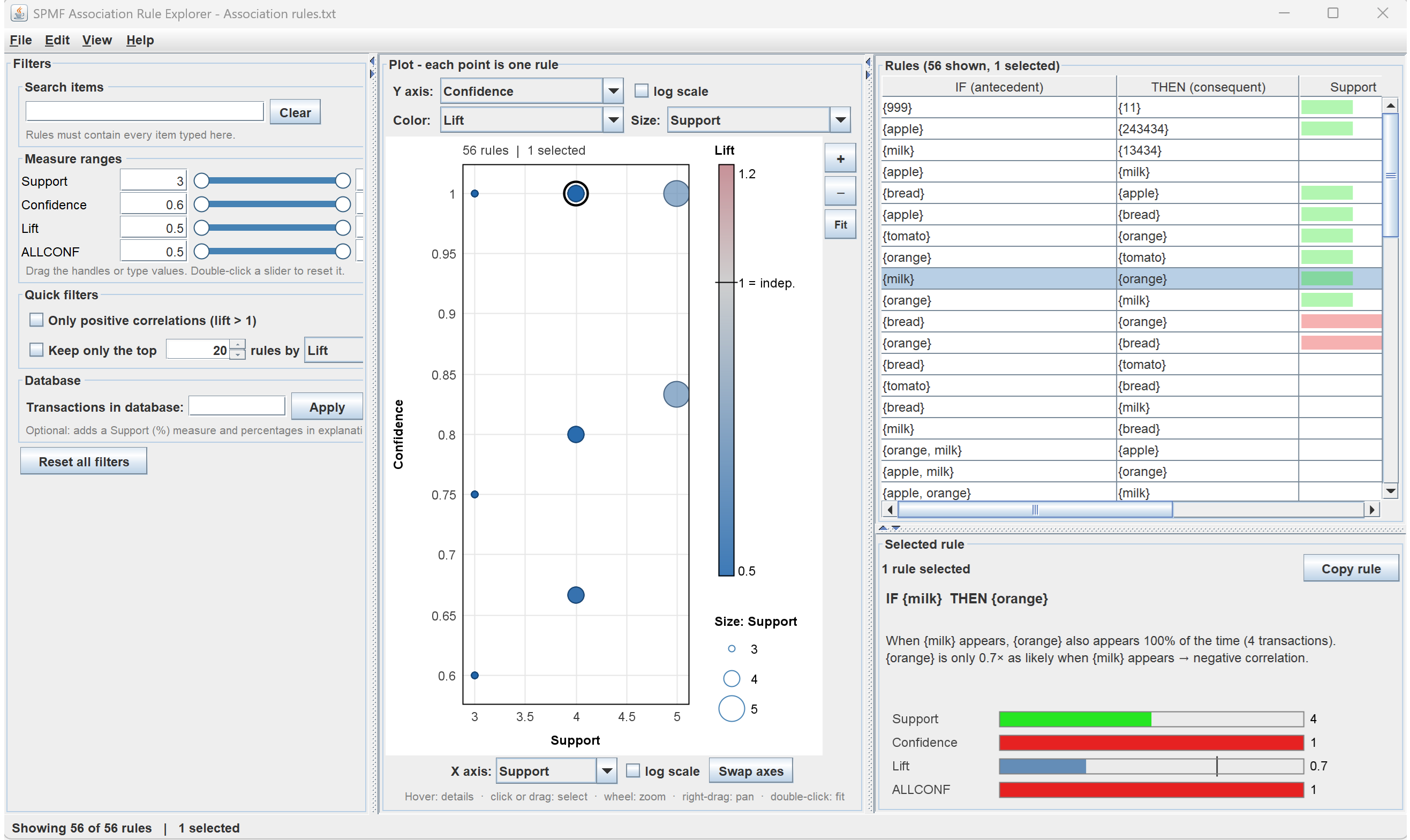
The interface consists of three panels:
- The right panel display the list of association rules contained in the file, and it displays additional information about the currently selected rule in the lower part of the panel.
- The left panel allows to apply filters on the association rules by for example, searching for specific items or applying constraints on the values for measures of association rules.
- The center panel displays the rules as a chart where each point represent one or more rules, and axis, point size and color can be configured to represent different measure such as confidence and support.
Other ways of running the Association Rule Explorer
It is also possible to run the Itemset-Item Matrix Viewerr as an algorithm from the GUI of SPMF..
In this case, in the user interface of SPMF, select "Association_rule_explorer" as algorithm. Then, select a file containing association rules as input file. Then, click "run algorithm".
This will display the patterns from the file using the association rule explorer
Besides, it is also possible to call the Association Rule Explorer from the command line interface of SPMF using the following syntax. To open a file called: patternsAssociationRules.txt, the command is:
java -jar spmf.jar run Association_rule_explorer patternsAssociationRules.txt in a folder containing spmf.jar and the input file.
What is the input file format?
The algorithm takes as input a file containing association rules in SPMF format. This format can vary slightly depending on the algorithms that are used to generate the patterns. Hence, you may look at the documentation of the algorithms that you are interested in using for more details about the output format. The output file format of a typical association rule mining algorithm is defined as follows. It is a text file, where each line represents an association rule. On each line, the items of the rule antecedent are first listed. Each item is represented by an integer, followed by a single space. After, that the keyword "==>" appears followed by a space. Then, the items of the rule consequent are listed. Each item is represented by an integer, followed by a single space. Then, the keyword " #SUP: " appears followed by the support of the rule represented by an integer. Then, the keyword " #CONF: " appears followed by the confidence of the rule represented by a double value (a value between 0 and 1, inclusively). For example, here is a file having this format:
@FILETYPE="Association rules"
@SOURCE="SPMF SOFTWARE https://philippe-fournier-viger.com/spmf/"
1 ==> 2 4 5 #SUP: 3 #CONF: 0,75
5 ==> 1 2 4 #SUP: 3 #CONF: 0,6
4 ==> 1 2 5 #SUP: 3 #CONF: 0,75
The first two lines are metadata indicating the type of pattern in this file and the source of the data. Then it is the data section. The first line of data indicates that the association rule {1} --> {2, 4, 5} has a support of 3 transactions and a confidence of 75 %. The other lines follow the same format.
Note that besides the support and confidence, some association rule mining algorithms may use other measures as well such as the lift. Besides, some algorithms may produce rules where items have names:
@FILETYPE="Association rules"
@SOURCE="SPMF SOFTWARE https://philippe-fournier-viger.com/spmf/"
apple ==> milk bread #SUP: 3 #CONF: 0.75
tomato bread ==> orange #SUP: 3 #CONF: 1.0
orange bread ==> tomato #SUP: 3 #CONF: 0.6
orange tomato ==> bread #SUP: 3 #CONF: 0.75
Please see the documentation of specific algorithms for more details about the different formats.