View Itemsets using the Sequential Pattern Explorer (SPMF documentation)
This page explain how to use the tool called the Itemsets-Item Matrix Viewer to visualize a set of itemsets produced by an itemset mining algorithm.
How to run this example?
If you want to run this example using the graphical user interface of SPMF, follow these steps.
1) First, select an sequential pattern mining algorithm offered in SPMF such as CM-SPAM and PrefixSpan. Several algorithms are offered and are described in the documentation of SPMF.
2) Then, in the user interface of SPMF, after selecting an algorithm and setting its input file path, output file path, and parameters, click on the combo-box besides "Open output file using:", and select "Sequential_pattern_explorer" so that the discovered patterns will be opened with the Sequential Pattern Explorer tool.
3) Then click on "Run algorithm" to run the algorithm. After the algorithm terminates, the discovered patterns will be displayed using the Sequential_pattern_explorer:
The interface of the Sequential Pattern Explorer is like this:
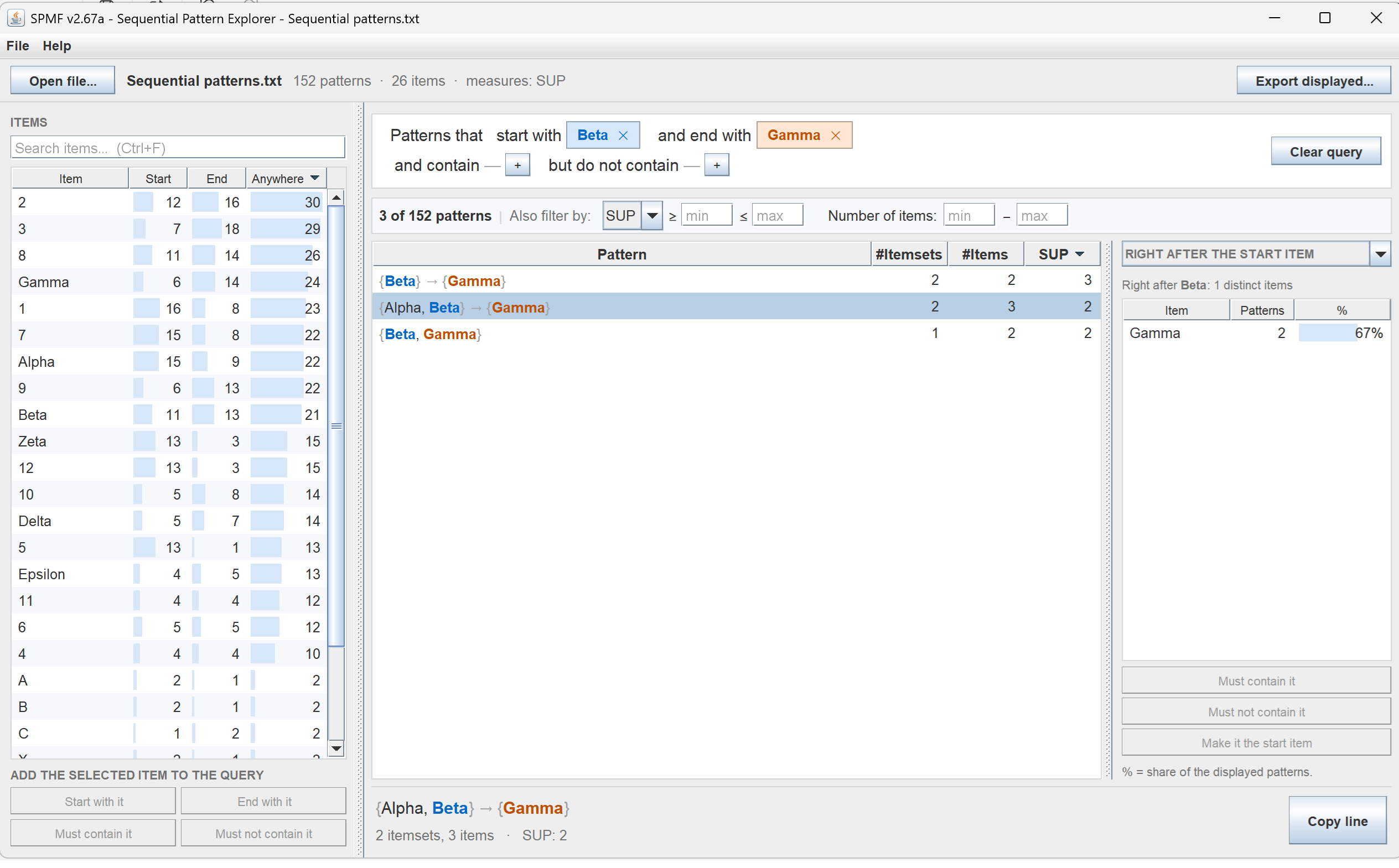
The panel on the left displays the list of items appearing in sequential patterns and their frequency at the start, end, or anywhere inside a sequential pattern.
In the top of the right panel, it is possible to create aquery by adding items.
Other ways of running the Sequential Pattern Explorer
It is also possible to run this viewer as an algorithm from the GUI of SPMF:
In this case, in the user interface of SPMF, select "Sequential_pattern_explorer" as algorithm. Then, select a file containing itemsets as input file. Then, click "run algorithm".
This will display the patterns from the file using the Sequential Pattern Explorer.
Besides, it is also possible to call the tool from the command line interface of SPMF using the following syntax. To open a file called: patternsFrequentSequentialPatterns.txt, the command is:
java -jar spmf.jar run Sequential_pattern_explorer FrequentSequentialPatterns.txt in a folder containing spmf.jar and the input file.
What is the input file format?
The input file format is defined as follows. It is a text file containing sequential patterns. The first two lines are metadata indicating the type of patterns in this file and the source of the data. Then the following lines provide the list of patterns, where each line is a frequent sequential pattern. Consider the case of frequent sequential patterns. Each item from a sequential pattern is a positive integer and items from the same itemset within a sequence are separated by single spaces. The value "-1" indicates the end of an itemset. On each line, the sequential pattern is first indicated. Then, the keyword " #SUP: " appears followed by an integer indicating the support of the pattern as a number of sequences. For example, a few lines from an output file are shown below:
@FILETYPE="Frequent sequential patterns"
@SOURCE="SPMF SOFTWARE https://philippe-fournier-viger.com/spmf/"
2 3 -1 1 -1 #SUP: 2
6 -1 2 -1 #SUP: 2
6 -1 2 -1 3 -1 #SUP: 2
The first line indicates that the frequent sequential pattern consisting of the itemset {2, 3}, followed by the itemset {1} has a support of 2 sequences.
It is possible to use this tool for browsing different types of sequential patterns. Some types for example may have more than one measure describing them. It is also possible to assign names to items such as in this example:
apple | #SUP: 4
orange | #SUP: 4
tomato | #SUP: 4
apple | orange | #SUP: 4
For more details about the different types of files for storing sequential patterns, please see the corresponding documentation page for each sequential pattern mining algorithms in the documentation of SPMF.